

Plans
Starter
For hobbyists with light use to explore Magic Patterns.
Business
For professionals & product teams building with Magic Patterns.
Enterprise
For large orgs looking to replace their legacy workflows and become
AI-native.
Plans are by Workspace
By default, everyone works inside a workspace: you always have at least one of your own, and you can join or create more. Plans in Magic Patterns are applied at the workspace level, not to your account as a whole. Billing, credits, and plan features belong to whichever workspace you are using. You can be a member of multiple workspaces—some may be on paid plans while others are on the free tier. Open the workspace selector in the sidebar, choose another workspace, and you switch context; the selector also shows which plan each workspace is on.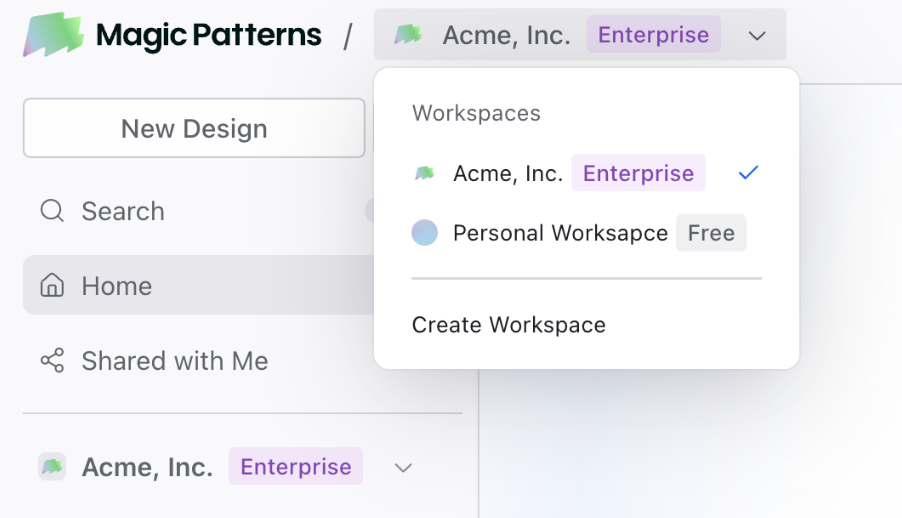
| Free | Starter | Business | Enterprise | |
|---|---|---|---|---|
| Price | $0/seat/mo | $20/seat/mo | $100/seat/mo | Custom |
| Annual price | $0/seat/mo | $17/seat/mo | $85/seat/mo | Custom |
| Monthly credits | 100 | 1,000 | 5,000 | Custom |
| Team workspace | Up to 10 paid seats | 11+ paid seats | 11+ paid seats | |
| On-Demand Usage | ✓ | ✓ | ✓ | |
| Design systems | ✓ | ✓ | ✓ | |
| No watermark | ✓ | ✓ | ✓ | |
| GitHub sync | ✓ | ✓ | ✓ | |
| Magic Patterns MCP | ✓ | ✓ | ✓ | |
| Centralized billing | ✓ | ✓ | ✓ | |
| Faster AI models | ✓ | ✓ | ||
| Self-serve SSO | ✓ | ✓ | ||
| User roles & permissions | ✓ | ✓ | ||
| Usage reporting | ✓ | ✓ | ||
| Shared credit pooling | ✓ | |||
| SCIM & audit logs | ✓ | |||
| Technical account manager | ✓ | |||
| Priority support | ✓ | |||
| Custom contracts | ✓ | |||
| Flexible invoicing | ✓ |
Credits
Credits are consumed when you use AI generation features. Cost scales with the complexity of the task.Predictability
We researched credit usage across many real designs so you can estimate session costs before you start. The table below shows average credits by how many iterations a design goes through.| Versions | Avg credits | Avg credits/version |
|---|---|---|
| 1 | 27 | 27 |
| 2–3 | 66 | 28 |
| 4–5 | 107 | 24 |
| 6–10 | 179 | 24 |
| 11–20 | 340 | 23 |
| 21–50 | 641 | 20 |
| 51–100 | 975 | 14 |
| 100+ | 2,500 | 11 |
Viewing Credit Consumption
After each AI generation, you can see exactly how many credits were consumed and which model was used. The summary appears at the bottom of the AI response in the chat, showing credits used, tool calls, lines changed, and the model used—helping you understand usage in real time.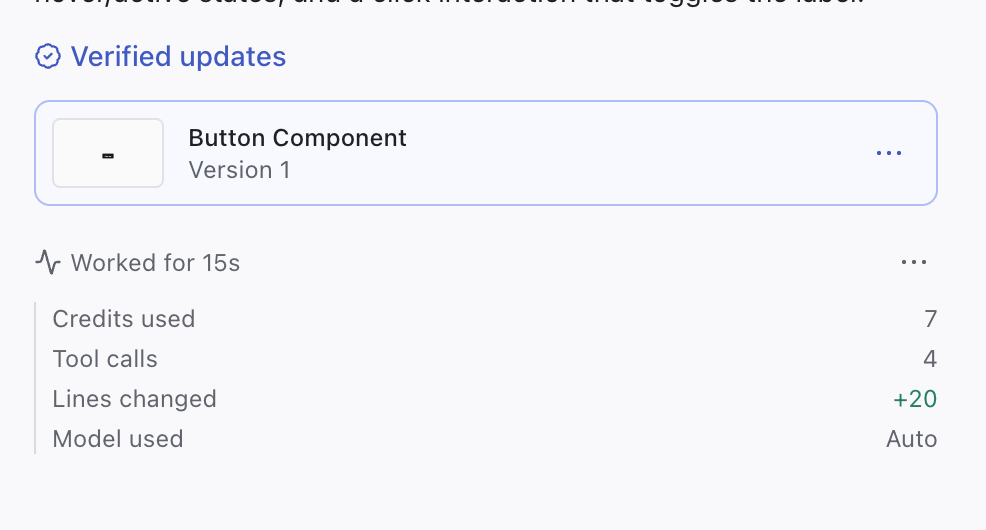
Choosing the Right Model
You can select which AI model to use for each generation using the model picker. Different models have different strengths and credit costs: hover over each option to see how they compare.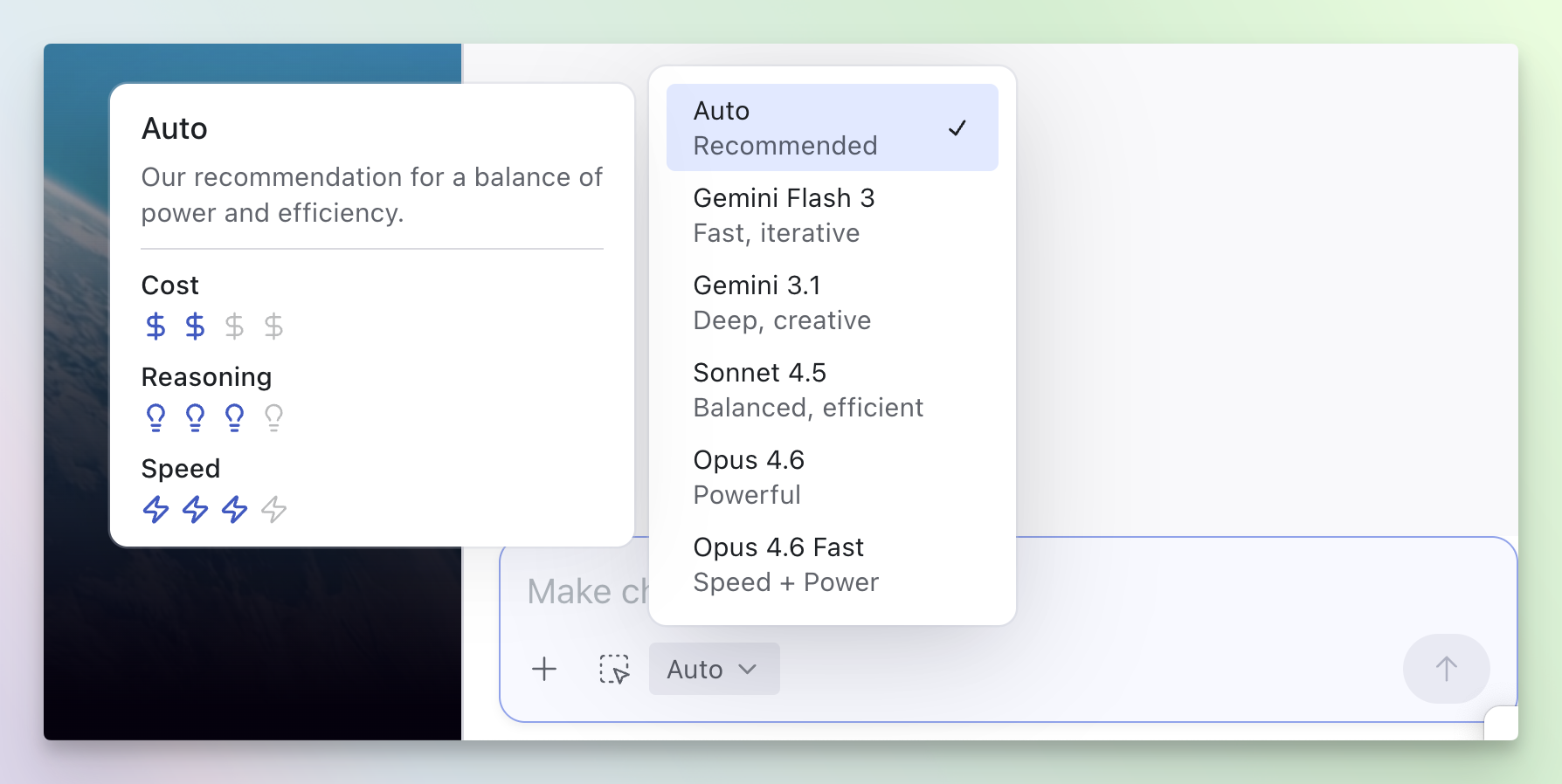 Choosing models based on your task:
- For smaller, targeted changes: Consider using a faster model when you’re making focused edits, quick iterations, or lightweight adjustments. These models work well when you have a clear, specific request.
- For complex design challenges: When tackling larger creative tasks, exploring new directions, or working on more sophisticated UI problems, a more capable model can provide better results.
Managing Conversation Context
Each follow-up prompt carries the earlier conversation along as context, which adds to the credits a generation uses. Magic Patterns manages this context automatically, so you usually don’t need to think about it. If you want more control, two commands let you trim the context yourself:/Clear— resets the current conversation context without needing to fork the design. Use it when you start an unrelated task on the same design./Summarize— condenses the conversation so far, preserving the important details while freeing up context.
Monthly Refresh Cycle
- Monthly plans: Credits renew when your invoice is paid (when Stripe successfully charges your payment method).
- Annual plans: Credits renew at 2:00 AM UTC on the day after your billing date. The exact local time depends on your timezone (e.g., ~7:00 PM PST or 2:00 AM the next day in London).
- Subscription changes are captured and applied before credits refresh.
Credit Rollover
We believe rollovers are only fair! Unused monthly credits roll over to the next month and expire after 1 month.On-Demand Usage
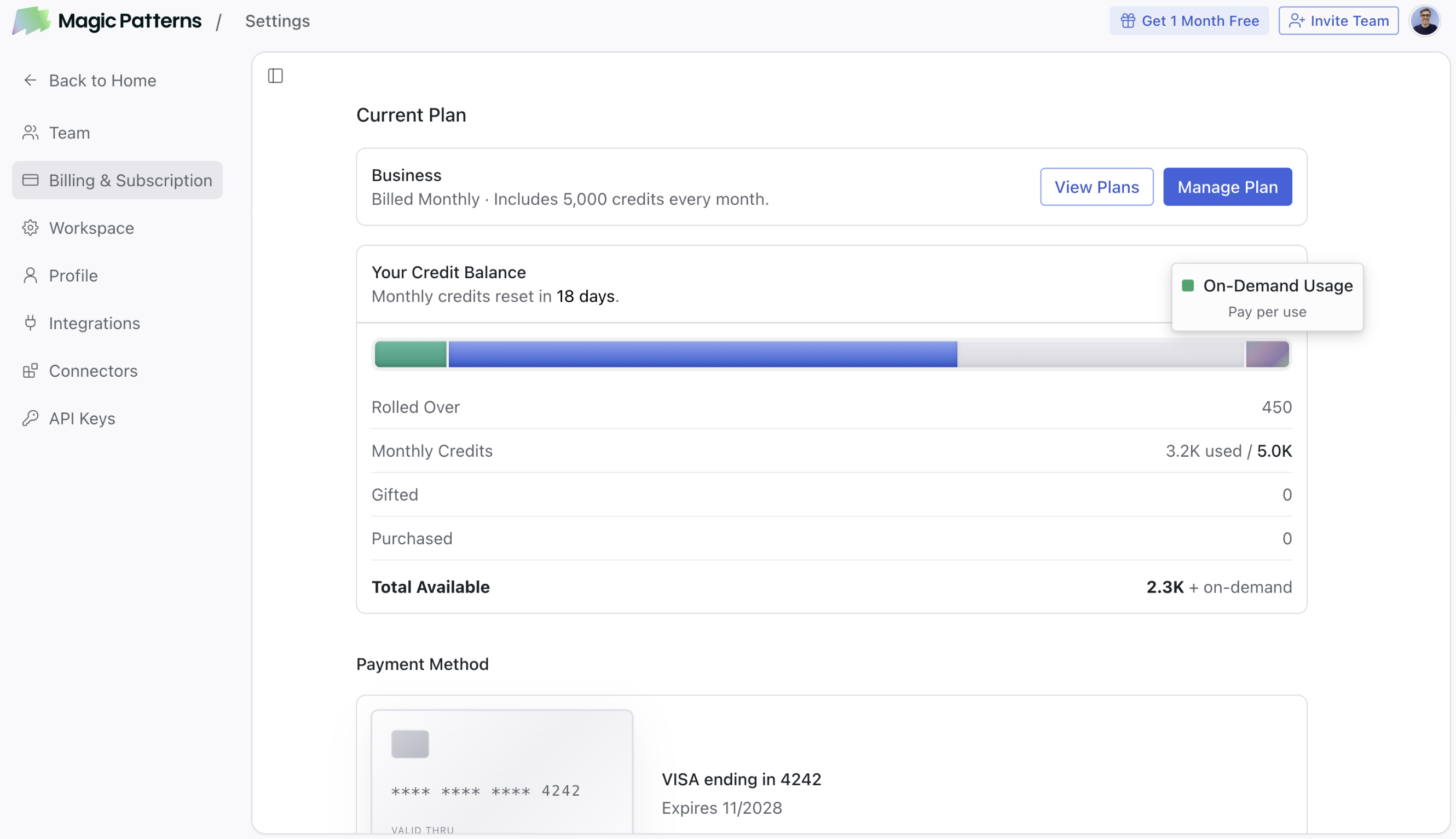 On-Demand Usage lets you keep generating after your monthly credits run out, with pay-as-you-go billing. It is only available on paid plans (Starter, Business, Enterprise).
How it works
- Be on a paid plan (Starter, Business, or Enterprise).
- Go to magicpatterns.com/settings/subscription, click Manage Plan, and enable On-Demand Usage.
- When your monthly credits run out, you keep generating. Each additional credit costs $0.02 with pay-as-you-go billing on your next invoice.
Budget Alerts
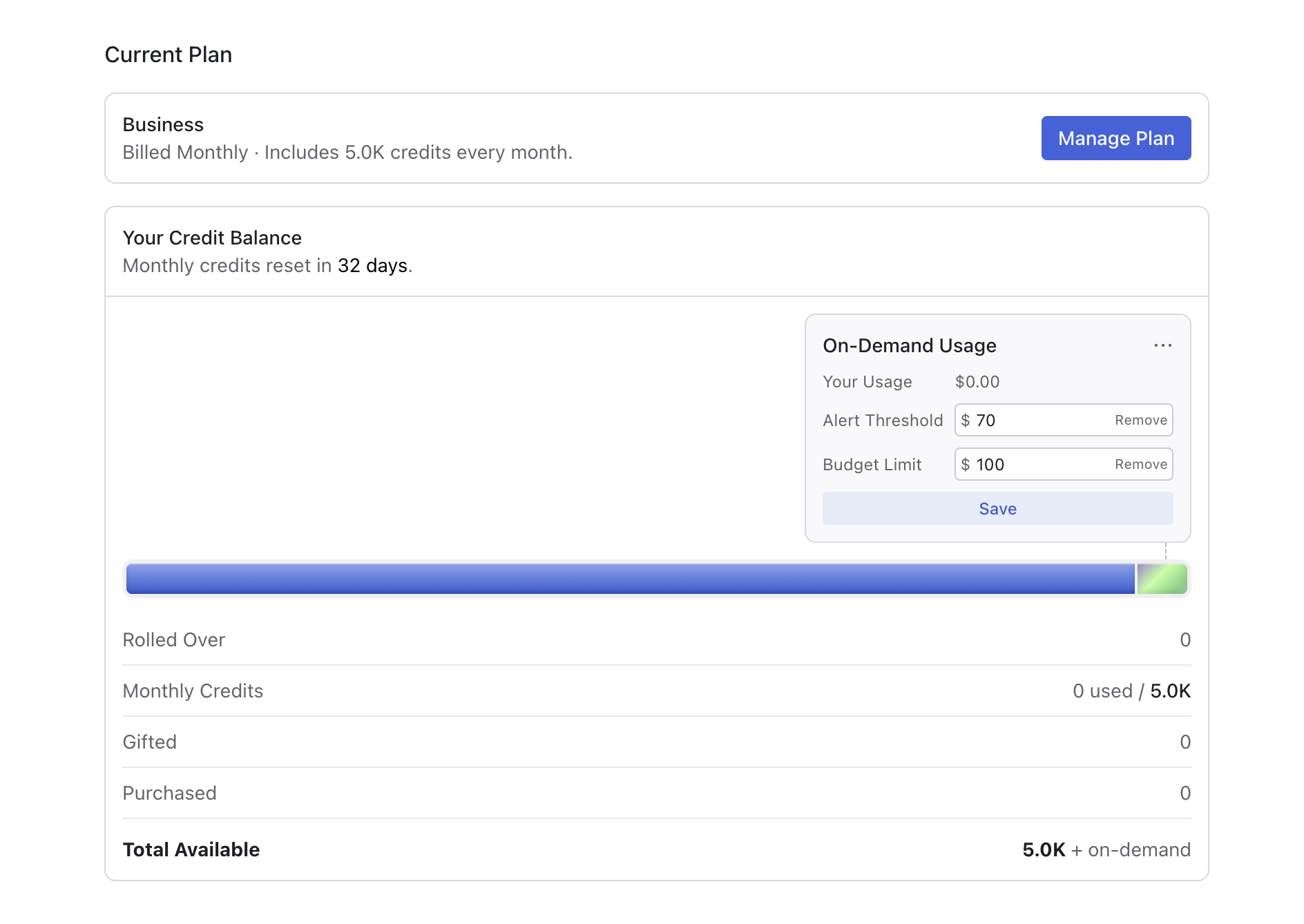 If you’re on a paid plan with On-Demand Usage enabled, you can set budget limits and alert thresholds at magicpatterns.com/settings/subscription. When your on-demand spending reaches an alert threshold, Magic Patterns shows a banner in the editor near the chat prompt with a link to manage your budget; you can dismiss the banner after you have reviewed it.
Billing
Where to manage billing
Go to magicpatterns.com/settings/subscription to manage your plan, enable On-Demand Usage, set spending limits, and download invoices. This page works for both workspace and individual plans.
Invoices
Download past invoices as PDF from magicpatterns.com/settings/subscription.Teams
Team workspace tiers
All paid members must be on the same plan tier. If your workspace has 11 or more paid seats, it requires the Business or Enterprise plan. Free seats can always be added to any workspace at no cost.Managing your team
Go to magicpatterns.com/settings/team to add or remove seats, manage team members, and upgrade or downgrade users. Use this if you’re an admin managing your workspace. For more details on setting up and managing team workspaces, see the Team Workspaces page.FAQ
Can I switch plans anytime?
Can I switch plans anytime?
Yes. Upgrades are immediate with prorated billing. Downgrades take effect at
your next billing cycle.
What counts as a credit?
What counts as a credit?
Any AI generation action: prompting, agent mode, component generation. Cost
scales with complexity (input/output tokens). “Fix” commands and manual
edits are free. Most designs use around 30–100 credits total.
Do credits expire?
Do credits expire?
Rolled-over credits expire one month after they’re added.
What happens to my projects if I downgrade or cancel?
What happens to my projects if I downgrade or cancel?
Projects and code are never deleted. You lose access to plan-specific
features but can still view, edit, and export your work.
Can I get a refund?
Can I get a refund?
Contact support@magicpatterns.com for
refund requests.
How do I download invoices?
How do I download invoices?
Download past invoices from
magicpatterns.com/settings/subscription.
Can I set a spending limit on On-Demand Usage?
Can I set a spending limit on On-Demand Usage?
Yes, if you’re on a paid plan with On-Demand Usage
enabled. Set budget limits and alert thresholds at
magicpatterns.com/settings/subscription.